
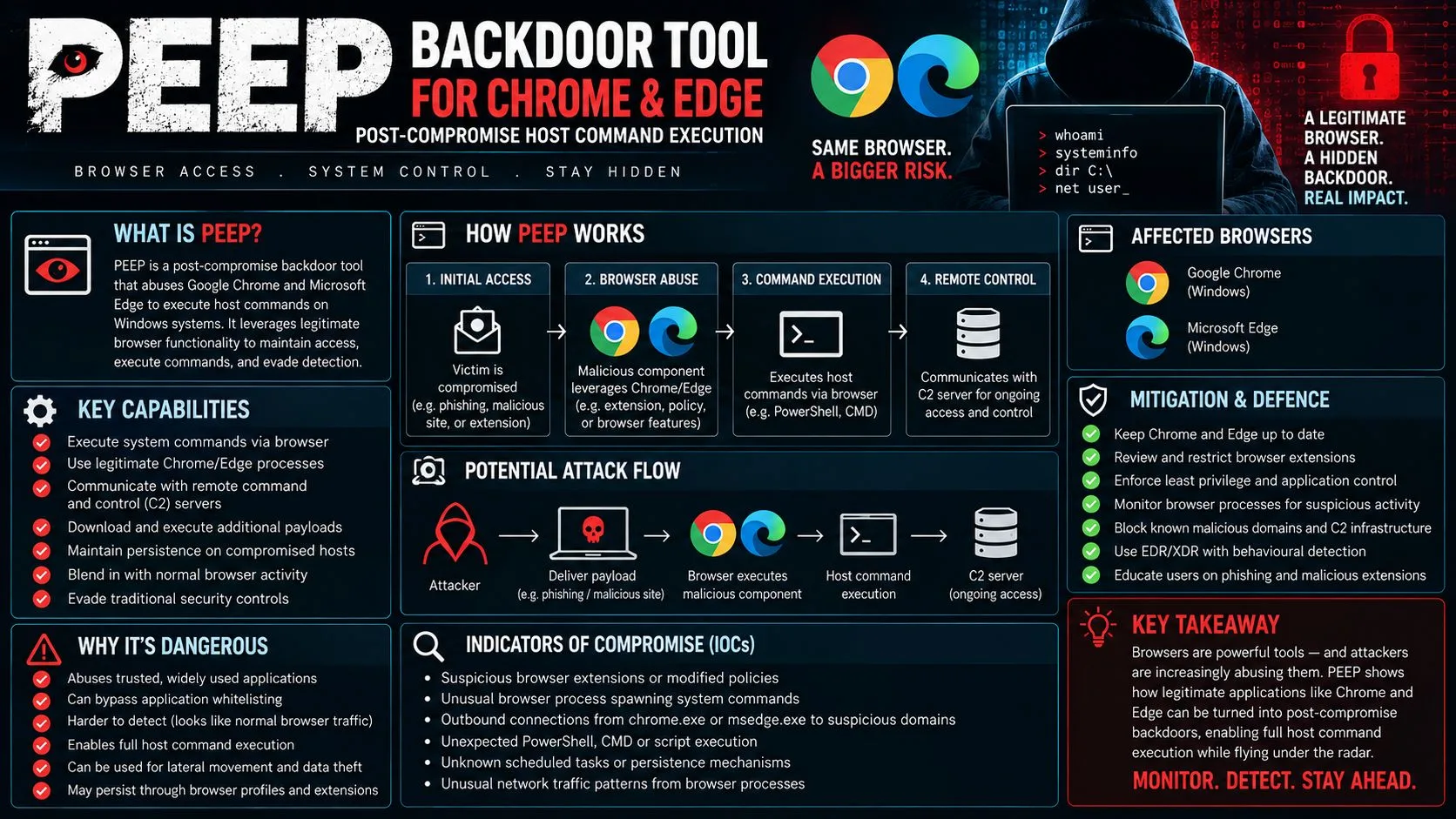
- PEEP is a post-exploitation Chrome/Edge extension disguised as “Smart Bookmarks” that transforms an already-compromised browser into a full remote access tool capable of executing host-level shell commands.
- It is built on the open-source RedExt framework but adds native-messaging bridges, persistence mechanisms, and expanded data theft that RedExt alone does not provide.
- PEEP breaks out of the browser sandbox using a native-messaging component called nm_host.exe registered under com.peep.lab, giving attackers file system access and process control from inside the browser process.
- The C2 server communicates over unencrypted HTTP every 30 seconds — and at least one exposed server left source code and a private key visible in an open directory on port 5002.
- Standard URL filtering and marketplace reputation checks won’t stop PEEP — defenders need native-messaging host monitoring, strict enterprise extension policies, and host-level telemetry to catch it.
PEEP Turns Your Browser Into a Remote Access Tool
Your browser is no longer just a window to the internet — for attackers using PEEP, it is a fully operational backdoor sitting inside your own machine.
PEEP is a Chromium-based post-exploitation toolkit that researchers at SOCRadar identified and analyzed after finding it disguised as a Chrome extension called “Smart Bookmarks.” It does not arrive through the Chrome Web Store. Instead, it requires an attacker to already have administrative or code execution access on the target machine — making it a post-compromise tool, not an initial infection vector. Once installed, though, it operates persistently inside the browser and reaches well beyond it.
What PEEP Actually Is
PEEP is a modular client/server remote access framework with three distinct components working together. It is not a single malware file you can simply quarantine and move on from. Its architecture is derived from RedExt, an open-source browser-extension-based Command & Control project, but PEEP extends that foundation with capabilities that make it substantially more dangerous in operational environments.
Once active inside Chrome or Edge, the extension requests broad permissions — access to tabs, cookies, history, bookmarks, downloads, browser settings, scripting, and every website the browser visits. That permission set alone should trigger alarm bells for any security team reviewing installed extensions. But PEEP goes further than just abusing browser permissions.
“PEEP proves that the modern web browser has evolved into a primary, high-value attack surface that demands host-level telemetry, strict policy enforcement, and continuous behavioral monitoring of native-messaging host activity.”
— SOCRadar Research Team
How It Gets Into Chrome and Edge
PEEP does not rely on a user downloading a malicious extension from a store. Its installer injects the extension directly into Chrome or Edge after the attacker has already gained administrative access. It uses enterprise force-install policies and sideloading techniques to place the extension without triggering the browser’s standard developer mode warnings. This is a critical distinction — the typical visual cues users rely on to spot suspicious extensions simply do not appear.
Why It Is Dangerous Beyond Normal Browser Threats
Most malicious browser extensions stay inside the browser sandbox — they can steal what the browser sees, but they cannot touch your file system or run system commands. PEEP eliminates that boundary entirely. By bridging into the host operating system through its native-messaging component, it effectively converts the browser into a pivot point for full host compromise, operating under the signed browser process to avoid traditional detection methods.
PEEP’s Origins: Built on the RedExt Framework
Understanding where PEEP came from helps explain why it is as capable as it is. For those interested in comprehensive security solutions, exploring endpoint security comparisons can provide further insights into its capabilities.
What RedExt Is and Why It Matters
RedExt is an open-source browser extension-based Command & Control framework available publicly on GitHub. It was designed as a proof-of-concept demonstrating how Chrome extensions could be weaponized as C2 agents — registering with a server, receiving commands, and returning data from inside the browser. On its own, RedExt is already a meaningful threat model. PEEP takes that model and operationalizes it.
How PEEP Expands on RedExt
While PEEP retains RedExt’s core registration and agent communication protocol, it adds several layers that transform it from a research concept into a deployable attack tool. These additions include dedicated installation routines that bypass developer mode warnings, a native-messaging host bridge for OS-level access, a heartbeat beacon system, and HMAC-SHA256 Secure Preferences forgery to maintain persistence. The operator also added arbitrary command execution, filesystem manipulation, and process discovery — none of which exist in base RedExt.
Although PEEP is self-labeled as “RedExt-compatible,” it is more accurately described as an operational derivative — purpose-built for real-world post-compromise use rather than security research demonstration.
How PEEP Executes Host Commands Through the Browser
This is where PEEP separates itself from virtually every other malicious browser extension seen in the wild. Its ability to cross the browser sandbox boundary and interact directly with the Windows host is its most dangerous capability.
- Shell command execution — run arbitrary commands on the host OS from inside the browser
- Filesystem manipulation — search directories, read files, write files, and delete files
- Process and service discovery — enumerate running processes and installed services
- JavaScript injection — inject scripts into active web pages in real time
- Proxy configuration changes — redirect browser traffic at the attacker’s discretion
- Page content capture — snapshot what is currently displayed in any open tab
The Native-Messaging Bridge: com.peep.lab and nm_host.exe
The mechanism enabling all of this is Chrome’s native-messaging API, which is a legitimate browser feature designed to allow extensions to communicate with local desktop applications. PEEP abuses this by registering a native-messaging host named com.peep.lab in the Chrome and Edge NativeMessagingHosts registry entries. The corresponding executable, nm_host.exe, is the host-side component that receives commands from the extension and executes them directly on the Windows operating system. For those interested in broader security measures, consider exploring endpoint security solutions to protect against such vulnerabilities.
Because nm_host.exe runs under the signed browser process, it blends into normal system activity in a way that purely executable-focused endpoint defenses are not designed to flag. The browser becomes the delivery mechanism, the persistence layer, and the command executor — all at once.
Breaking Out of the Browser Sandbox
Browser sandboxes are specifically designed to isolate web content from the underlying OS. PEEP’s native-messaging bridge is a legitimate, documented escape hatch from that sandbox — just one that was never intended to be weaponized at this level. The result is that security boundaries traditionally relied upon to contain browser-based threats become effectively irrelevant once PEEP is installed.
Shell Commands, File Management, and Process Discovery
Through nm_host.exe, a remote attacker can list all running processes and services, navigate the file system, exfiltrate specific files, write new files to disk, or delete evidence of their presence. Combined with the browser-side capabilities, this gives the operator the functional equivalent of a traditional remote access trojan — delivered and hidden inside a browser extension.
What PEEP Steals and What Attackers Can Do With It
The data collection side of PEEP is extensive, covering both browser artifacts and system-level reconnaissance information that helps the attacker understand and further exploit the environment.
On the browser side, PEEP harvests cookies, browsing history, bookmarks, active tab metadata, download records, and browser settings. It also collects the system’s public IP address, language settings, and time zone — information that helps the attacker fingerprint the victim’s environment and potentially correlate their identity across sessions. Critically, it steals active session cookies, which means an attacker can hijack logged-in sessions for banking, email, enterprise SaaS platforms, or any other authenticated service without ever needing the user’s password.
Beyond passive data collection, PEEP gives the operator active control. Commands can be sent to open specific URLs in the browser, inject JavaScript into pages the user is currently viewing, alter proxy settings to intercept or redirect traffic, and capture screenshots of page content. This moves PEEP well beyond credential theft into real-time session manipulation.
| Capability Category | Specific Data or Action |
|---|---|
| Browser Artifact Theft | Cookies, history, bookmarks, active tabs, downloads, browser settings |
| System Reconnaissance | Public IP, language, time zone, system details |
| Session Hijacking | Active login session cookies for any authenticated site |
| Web Page Manipulation | JavaScript injection, page content capture, proxy changes |
| Host-Level Control | Shell commands, file read/write/delete, process and service enumeration |
Browser Data Harvested by PEEP
PEEP does not limit itself to grabbing a password or two. It conducts a comprehensive sweep of everything the browser knows about the user. Collected data includes cookies, full browsing history, bookmarks, active tab metadata, download records, and browser configuration settings. On top of that, it pulls system-level identifiers including the device’s public IP address, language settings, and time zone — building a detailed profile of the victim that extends well beyond what the browser alone can see.
Session Hijacking and Web Page Manipulation
Stealing a password is one thing. Stealing an active session cookie is another level entirely. When PEEP exfiltrates session cookies from the victim’s browser, the attacker does not need credentials at all — they can simply import that cookie into their own browser and immediately access the victim’s authenticated sessions on banking platforms, corporate email, cloud storage, and enterprise SaaS tools. No login prompt. No multi-factor authentication challenge. The session is already live.
Beyond passive theft, PEEP’s operator can actively manipulate what the user sees and where their traffic goes. Commands can be sent in real time to open specific URLs in the victim’s browser, inject custom JavaScript into pages the user is currently viewing, alter proxy settings to redirect or intercept web traffic, and capture snapshots of active page content. This transforms PEEP from a data thief into a real-time man-in-the-browser tool.
Real-World Impact Example: An attacker using PEEP could silently inject JavaScript into a corporate banking portal while the victim is actively logged in — modifying transaction details on-screen before submission, capturing one-time codes as they appear, or redirecting fund transfers without the user ever seeing a warning or prompt.
The JavaScript injection capability deserves particular attention because it operates inside the browser’s trusted context. Unlike external phishing pages that require user action, injected scripts run on legitimate, authenticated pages the user already trusts and is actively using. Security controls built to detect external threats have no visibility into this kind of in-session manipulation.
Proxy manipulation adds another dimension. By rerouting the browser’s traffic through an attacker-controlled endpoint, PEEP can perform persistent traffic interception across all subsequent browsing sessions — not just the current one. The user has no visible indication their traffic is being redirected.
Host-Level Control in the Logged-In User’s Context
Everything PEEP executes at the host level runs in the context of the currently logged-in user. This means it inherits whatever access rights and credentials that user account holds — including access to mapped network drives, domain resources, locally stored credentials, and any applications running under that session. For a user with elevated privileges, the effective blast radius of a PEEP compromise extends across the entire environment that user can reach. For more on security vulnerabilities, see CVE-2021-4460 Linux Kernel vulnerability.
How PEEP Stays Hidden: Multi-Layered Persistence
What makes PEEP genuinely difficult to remediate is not just what it does — it is how effectively it hides itself and rebuilds after attempts to remove it. Its persistence strategy operates at multiple layers simultaneously, combining browser-level manipulation with OS-level registry entries to ensure it survives reboots, profile resets, and standard security scans.
Sideloading and Enterprise Force-Install Policies
Rather than appearing in the Chrome Web Store where it could be reviewed, flagged, or removed by Google, PEEP is sideloaded directly into the browser using enterprise extension force-install policies. These are legitimate Group Policy or registry-based mechanisms that organizations use to deploy approved extensions to managed devices. Attackers abuse these same mechanisms to install PEEP silently, bypassing the standard extension marketplace review process entirely and ensuring the extension loads automatically every time the browser launches.
HMAC-SHA256 Secure Preferences Forgery
Chrome maintains a file called Secure Preferences that records the state of installed extensions and detects unauthorized modifications. Under normal circumstances, tampering with this file causes Chrome to flag the extension as corrupted or unauthorized — potentially alerting the user or blocking the extension from loading. PEEP circumvents this protection by forging a valid HMAC-SHA256 signature for the modified Secure Preferences file, making its unauthorized entries appear legitimate to Chrome’s integrity checks.
This is not a trivial technique. Generating a valid HMAC-SHA256 signature requires knowledge of the key Chrome uses to validate that file, indicating that PEEP’s developers invested significant effort into defeating browser-native tamper detection. The practical result is that Chrome sees the extension as properly installed and signed — and raises no alarm.
- Force-install via Group Policy or registry — extension loads automatically on every browser launch without user consent
- HMAC-SHA256 Secure Preferences forgery — Chrome’s own integrity check is defeated, no tamper warning is triggered
- NativeMessagingHosts registry entries — com.peep.lab persists in the registry, surviving browser reinstalls that do not also clean the OS
- ScriptCache fallback mechanism — provides an additional recovery path if primary extension files are removed
- Runs inside the signed browser process — activity blends with legitimate browser behavior, evading executable-focused EDR rules
The combination of these techniques means that simply uninstalling the extension through the browser UI is almost certainly insufficient. As long as the registry entries for com.peep.lab and the force-install policy remain in place, the extension will reinstall itself the next time the browser opens.
Security teams responding to a PEEP compromise need to treat it as a full host remediation event — not a browser-level cleanup task. Registry keys, the nm_host.exe binary, modified Secure Preferences files, and any force-install policy entries all need to be identified and removed as part of a coordinated response.
ScriptCache Fallback and No Developer Mode Warnings
PEEP also leverages a ScriptCache fallback mechanism that provides an additional recovery path if the primary extension files are deleted or corrupted. This means even partial remediation attempts — where defenders remove the visible extension files but miss the cache — may result in PEEP rebuilding itself on the next browser session. It is a defense-in-depth approach applied to malware persistence.
Critically, none of PEEP’s installation methods trigger Chrome’s developer mode warnings — the banner that normally appears at the top of the browser when an unpacked or sideloaded extension is active. Users who rely on that visual cue to detect suspicious extensions will see nothing. The browser presents a completely clean, normal appearance while PEEP operates silently in the background.
PEEP’s Exposed C2 Infrastructure
Despite the sophistication of PEEP’s browser-side capabilities and persistence mechanisms, its command-and-control infrastructure reveals significant operational security failures on the part of its operator. These failures are valuable from a detection and attribution standpoint, but they also highlight how even well-engineered attack tools can be undermined by careless infrastructure management.
The C2 server that PEEP reports to is not hidden behind Tor, domain fronting, or encrypted channels. It communicates in the open, over standard HTTP, at predictable intervals — a pattern that network monitoring tools can identify with relatively straightforward traffic analysis rules once defenders know what to look for.
Unencrypted HTTP Beacons Every 30 Seconds
PEEP contacts its command-and-control server every 30 seconds over plaintext HTTP. Each beacon transmits collected data and checks for new operator instructions. The use of unencrypted HTTP means that any network monitoring solution with visibility into outbound traffic — a next-generation firewall, a network detection and response platform, or even a properly configured proxy — can capture the full content of these communications. For defenders, this regular 30-second interval also creates a highly consistent traffic pattern that behavioral detection rules can target effectively.
Open Directory on Port 5002: Source Code and Private Key Exposed
The most significant operational security failure associated with PEEP’s infrastructure is the discovery of an open directory on port 5002 on at least one identified C2 server. This exposed directory contained the PEEP source code and, critically, a private key — both publicly accessible without authentication. This level of exposure gives security researchers direct insight into the tool’s inner workings, accelerates the development of detection signatures, and potentially allows other threat actors to obtain and repurpose the same codebase.
For defenders, the existence of this open directory is both a gift and a warning. It confirms specific technical details about PEEP’s architecture that can be used to build precise detection rules. But it also demonstrates that the threat landscape around browser-based RATs is not static — exposed source code means variants and copycats are a realistic near-term concern.
Who Is Behind PEEP and Who Is at Risk
As of the time of SOCRadar’s analysis, PEEP has been attributed to an unidentified operator with no confirmed links to known nation-state groups or established cybercrime organizations. The absence of a clear attribution does not reduce the threat — it means the operator’s full capabilities, targeting priorities, and operational scale remain unknown. What is clear from the infrastructure and tooling is that this is not a script kiddie project. The HMAC-SHA256 forgery technique, modular architecture, and multi-layer persistence indicate a developer with meaningful technical depth.
In terms of who is at risk, PEEP’s post-exploitation nature means the primary targets are environments where an initial compromise has already occurred — making organizations with weak endpoint controls, poor privileged access management, or limited visibility into browser extension activity particularly vulnerable. Any environment where users have administrative rights on their own machines, or where enterprise extension policies are not actively monitored, represents a viable deployment target. Given that PEEP affects both Chrome and Microsoft Edge, the potential victim pool covers the vast majority of corporate endpoint environments globally.
Indicators of Compromise to Watch For
Identifying PEEP on a compromised system requires looking across browser artifacts, registry entries, running processes, and network traffic simultaneously. A single-vector check is unlikely to catch it, particularly given the persistence and evasion techniques described above.
Extension Artifacts and Disguised Identity
PEEP disguises itself as “Smart Bookmarks” within the browser’s extension list — a name chosen specifically to appear routine and non-threatening to anyone casually reviewing installed extensions. Security teams should audit all installed browser extensions across managed endpoints and flag any extension named Smart Bookmarks that was not explicitly approved and deployed through a documented change management process. The presence of com.peep.lab in the Chrome or Edge NativeMessagingHosts registry path is a definitive indicator of compromise, as this registry key has no legitimate software association and serves exclusively as PEEP’s host-bridge registration point.
Network and Host-Level IOCs
On the network side, the most actionable indicator is regular outbound HTTP traffic on a 30-second interval to an external host that is not part of any approved application inventory. Because PEEP uses plaintext HTTP rather than HTTPS, the full payload of these beacon requests is visible to any monitoring tool with network visibility. Security teams should also look for outbound connections specifically on port 5002, which was used by at least one identified PEEP C2 server. At the host level, the presence of nm_host.exe running as a child process of chrome.exe or msedge.exe is a high-confidence indicator that native-messaging abuse is occurring, regardless of whether the specific PEEP extension is identified.
How to Detect and Defend Against PEEP
Defending against PEEP requires a layered approach that spans browser policy, endpoint monitoring, and network visibility. No single control stops it on its own, and any defensive strategy that focuses exclusively on one layer will leave gaps that PEEP is specifically engineered to exploit. For a deeper understanding of how to protect sensitive data, you might find this comparison of data loss prevention solutions useful.
Monitor Native-Messaging Host Activity
The single most effective detection control for PEEP specifically — and browser-based RATs generally — is continuous monitoring of native-messaging host activity. Security teams should configure endpoint detection tools to alert on any new entry appearing under the HKCU\Software\Google\Chrome\NativeMessagingHosts or equivalent Edge registry paths. Any unrecognized native-messaging host registration should be treated as a high-priority alert requiring immediate investigation. Process monitoring should also flag instances of nm_host.exe or any unrecognized executable spawned as a child process of chrome.exe or msedge.exe — this parent-child relationship is abnormal and should not occur under legitimate browser operation.
Enforce Strict Browser Extension Policies
Enterprise environments should implement an explicit allowlist of approved browser extensions enforced through Group Policy or endpoint management platforms. Any extension not on the approved list should be blocked from loading, and attempts to install unlisted extensions should generate a security alert. This policy directly counters PEEP’s force-install technique — if the policy framework itself is locked down, unauthorized force-install entries will conflict with existing approved-list rules and fail to load silently. For more comprehensive strategies, you can explore endpoint security comparisons to enhance your security measures.
Regularly audit the extension allowlist itself. PEEP’s deployment method involves writing force-install entries into the same registry locations that IT administrators use for legitimate extension deployment. If an attacker has already gained administrative access, they may attempt to add PEEP’s extension ID to the approved list directly. Automated reconciliation of the live extension policy against a known-good baseline — run at frequent intervals — will catch unauthorized additions before they persist undetected across multiple patch cycles. For more on securing network environments, consider learning about firewall appliances for network security.
Host-Level Telemetry and EDR Gaps to Address
Traditional EDR solutions are tuned to detect malicious executables — suspicious binaries, unusual process injection, known malware hashes. PEEP deliberately operates inside the signed browser process to avoid exactly these detection mechanisms. To close this gap, EDR configurations need to be updated with browser-specific behavioral rules that monitor for unusual child process spawning from browser parent processes, unexpected registry writes to NativeMessagingHosts paths, and file system activity originating from browser process trees that is inconsistent with normal browsing behavior.
Host-level telemetry should also capture Secure Preferences file modification events. Changes to Chrome’s Secure Preferences file outside of a standard browser update or user-initiated extension install are abnormal and should generate an alert. Given that PEEP forges HMAC-SHA256 signatures to make these modifications appear legitimate to Chrome itself, the detection trigger needs to come from the file system monitoring layer rather than from Chrome’s own integrity checks, which PEEP has already defeated. For more insights on cybersecurity strategies, consider exploring different cybersecurity testing methods.
URL Filtering Is Not Enough on Its Own
URL filtering and web proxy solutions that block known malicious domains are a useful baseline control, but they are insufficient against PEEP for a straightforward reason: PEEP’s C2 domain may not appear on any threat intelligence blocklist, particularly in early-stage operations using fresh infrastructure. Because the beacons go out over plaintext HTTP, a proxy with SSL inspection is not even required to see the traffic — but the destination IP or domain still needs to be identified as malicious before a blocklist-based control can act on it.
The more durable detection approach is behavioral traffic analysis — flagging the regular 30-second beacon interval as anomalous regardless of destination. A browser process generating machine-regular outbound HTTP connections to an external host at 30-second intervals, particularly outside of business hours or from a device that does not run scheduled web-dependent tasks, is a pattern that behavioral network detection rules can identify without relying on known-bad indicators. Pair this with the host-level controls described above for the strongest combined defensive posture, as detailed in our cybersecurity testing methods.
PEEP Proves Browsers Are Now Primary Attack Surfaces
PEEP is not an anomaly — it is a signal. The browser has become the most-used application in the modern enterprise, and that makes it one of the most valuable targets for post-exploitation persistence. What PEEP demonstrates is that the security boundary many organizations implicitly rely on — the assumption that browser-based threats stay inside the browser — is no longer valid. When a browser extension can register a native-messaging host, execute shell commands, manipulate files, hijack authenticated sessions, and beacon collected data to a remote operator every 30 seconds, all while appearing as a routine bookmarks utility, the browser must be treated with the same security rigor applied to any other high-risk application on the endpoint. Endpoint security solutions like SOCRadar’s research and threat intelligence platform is one resource security teams can use to stay ahead of emerging post-exploitation toolkits like PEEP as they evolve.
Frequently Asked Questions
The questions below address the most common points of confusion around PEEP, its capabilities, and how organizations can respond to it effectively. For more information on cybersecurity measures, you can explore our guide on cybersecurity testing methods.
What is the PEEP backdoor tool and how does it work?
PEEP is a post-exploitation remote access toolkit that disguises itself as a Chrome or Edge browser extension called “Smart Bookmarks.” It requires an attacker to already have administrative or code execution access on the target machine before it can be deployed — it is not an initial infection vector. Once installed, it operates as a persistent backdoor inside the browser.
PEEP works through three coordinated components. The browser extension handles data collection and receives operator instructions. A native-messaging host component called nm_host.exe, registered under the identifier com.peep.lab, bridges the browser to the underlying Windows operating system. A remote command-and-control server receives beaconed data and issues commands every 30 seconds over plaintext HTTP.
Together, these components give the operator a comprehensive set of capabilities that go well beyond what a typical malicious extension can achieve. The key capabilities include:
- Stealing browser cookies, history, bookmarks, active tab data, and session tokens
- Hijacking authenticated login sessions without requiring the victim’s password
- Injecting JavaScript into live, authenticated web pages the victim is currently using
- Executing shell commands on the host operating system through nm_host.exe
- Reading, writing, and deleting files anywhere the logged-in user has access
- Enumerating running processes and services for further lateral movement planning
- Modifying browser proxy settings to redirect or intercept all subsequent web traffic
All of this activity runs inside the signed browser process, making it difficult for traditional executable-focused endpoint detection tools to identify without browser-specific behavioral monitoring rules in place.
Does PEEP affect both Google Chrome and Microsoft Edge?
Yes. PEEP targets both Google Chrome and Microsoft Edge because both are built on the Chromium engine and share the same underlying extension architecture, NativeMessagingHosts registry structure, and native-messaging API. The installer injects the extension and registers the com.peep.lab native-messaging host in the appropriate registry paths for both browsers, meaning a single PEEP deployment can establish persistence across whichever Chromium-based browser the victim uses as their default.
How do attackers install PEEP without the user noticing?
PEEP uses enterprise force-install policies and direct sideloading techniques to place the extension into the browser without triggering the developer mode warning banner that Chrome and Edge normally display when an unpacked or unauthorized extension is active. The extension is also named “Smart Bookmarks” — a deliberately generic, non-threatening label designed to avoid scrutiny from users who do casually review their installed extensions. Additionally, PEEP forges a valid HMAC-SHA256 signature in Chrome’s Secure Preferences file, defeating the browser’s own integrity check so that Chrome treats the extension as properly installed and raises no internal warning. The net result is a completely clean browser appearance with no visual indicators of compromise visible to the user.
What is nm_host.exe and why is it dangerous?
nm_host.exe is PEEP’s native-messaging host component — the executable that bridges the browser extension to the Windows operating system. It is registered in the browser’s NativeMessagingHosts registry entries under the identifier com.peep.lab, which tells Chrome and Edge to launch nm_host.exe whenever the PEEP extension initiates a native-messaging connection. What makes it dangerous is that it runs under the signed browser process and executes with the full permissions of the logged-in user, allowing it to run shell commands, access the file system, enumerate processes and services, and perform any other action that the user account is authorized to perform — all directed remotely by the attacker through the browser extension as an intermediary.
How can security teams detect PEEP on a compromised system?
Detection requires checking across four areas simultaneously rather than relying on any single indicator. A single-vector check is unlikely to catch a fully deployed PEEP installation, particularly given its multi-layer persistence mechanisms.
At the registry level, check for the presence of com.peep.lab under HKCU\Software\Google\Chrome\NativeMessagingHosts and the equivalent Microsoft Edge path. This registry key has no legitimate software association and is a definitive indicator of PEEP deployment. Also audit the Chrome and Edge extension force-install policy registry keys for any extension ID that was not explicitly approved through your change management process. For further insights on protecting your systems, explore data loss prevention strategies.
At the process level, monitor for nm_host.exe or any unrecognized executable spawned as a child process of chrome.exe or msedge.exe. This parent-child relationship is not normal browser behavior and should generate an immediate high-priority alert in any properly configured EDR environment.
At the network level, look for regular outbound HTTP connections at 30-second intervals from browser processes to external hosts, particularly on non-standard ports including port 5002. Because PEEP uses plaintext HTTP, the full beacon payload is visible without SSL inspection — network monitoring tools can capture and analyze the content directly to confirm PEEP-specific communication patterns.
At the browser artifact level, audit all installed extensions across managed endpoints for any instance of an extension named “Smart Bookmarks” that was not explicitly deployed through an approved IT process. Also monitor Chrome’s Secure Preferences file for modification events that do not correspond to a standard browser update or documented extension deployment — unauthorized changes to this file, particularly ones that maintain a valid HMAC-SHA256 signature, are a strong indicator that PEEP’s persistence mechanism has been activated. For comprehensive browser threat intelligence and emerging threat tracking, SOCRadar provides ongoing research into post-exploitation toolkits including detailed technical analysis of tools like PEEP.